


Page 103 - Computer
P. 103
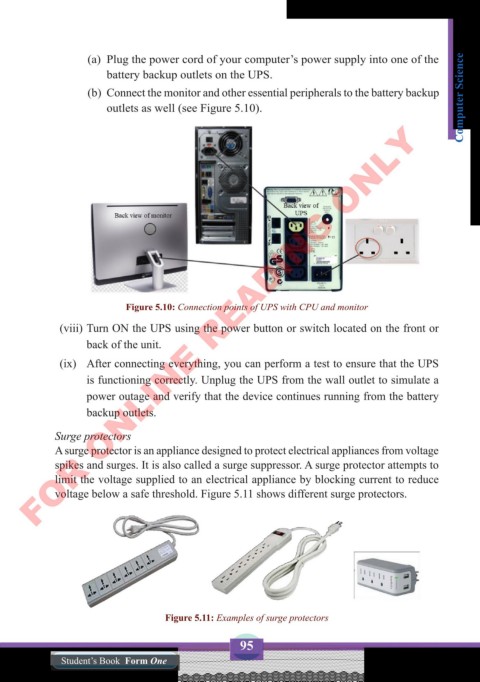
(a)  Plug the power cord of your computer’s power supply into one of the
                       battery backup outlets on the UPS.
                   (b)  Connect the monitor and other essential peripherals to the battery backup   Computer Science
                       outlets as well (see Figure 5.10).
        FOR ONLINE READING ONLY


                           Figure 5.10: Connection points of UPS with CPU and monitor

             (viii) Turn ON the UPS using the power button or switch located on the front or
                   back of the unit.
             (ix)  After connecting everything, you can perform a test to ensure that the UPS
                   is functioning correctly. Unplug the UPS from the wall outlet to simulate a
                   power outage and verify that the device continues running from the battery
                   backup outlets.


            Surge protectors
            A surge protector is an appliance designed to protect electrical appliances from voltage
            spikes and surges. It is also called a surge suppressor. A surge protector attempts to
            limit the voltage supplied to an electrical appliance by blocking current to reduce
            voltage below a safe threshold. Figure 5.11 shows different surge protectors.


                                   Figure 5.11: Examples of surge protectors


                                                   95
              Student’s Book  Form One

