


Page 138 - Computer
P. 138
Computer Science


        FOR ONLINE READING ONLY


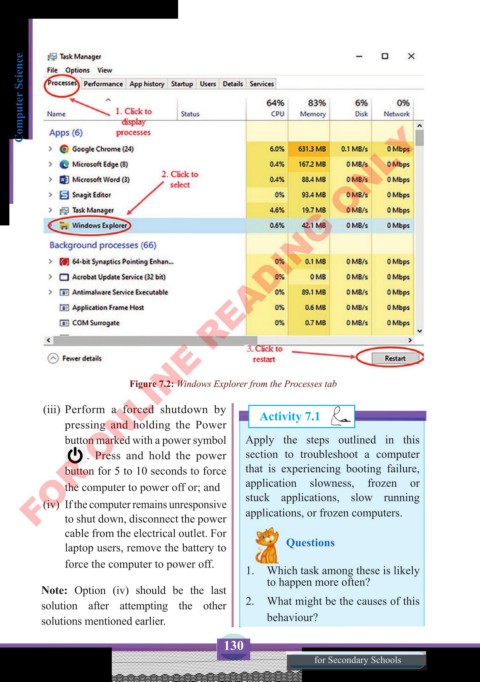
                            Figure 7.2: Windows Explorer from the Processes tab

          (iii) Perform a forced shutdown by            Activity 7.1
              pressing and holding the Power
              button marked with a power symbol     Apply the steps outlined in this
                   . Press and hold the power       section  to troubleshoot a computer
              button for 5 to 10 seconds to force   that is experiencing booting failure,
              the computer to power off or; and     application  slowness,  frozen or
          (iv)  If the computer remains unresponsive   stuck applications,  slow running
              to shut down, disconnect the power    applications, or frozen computers.
              cable from the electrical outlet. For
              laptop users, remove the battery to             Questions
              force the computer to power off.
                                                    1.  Which task among these is likely
                                                        to happen more often?
          Note: Option (iv) should be the last
          solution after attempting the other       2.  What might be the causes of this
          solutions mentioned earlier.                  behaviour?

                                               130
                                                                  for Secondary Schools

