


Page 60 - Computer
P. 60
Computer Science  It can store each bit of data in a separate   (ii)   by checking RAM type, speed,
                                                           and maximum capacity.
          capacitor within a particular integrated
          circuit.  The  transistors  and  capacitors
                                                           Make sure that the RAM modules
          are paired to make a memory cell. The
                                                           match the motherboard's
          transistor acts as a switch that lets the
                                                           specifications.
        FOR ONLINE READING ONLY
          control  circuitry  on  the  memory  chip
          read  the  capacitor  or change  its state.   (iii)  Shut down the computer.
                                                     (iv)  Disconnect the power cord from
          Figure 3.22 shows a DRAM module.                 the electrical outlet.

                                                     (v)   Wear an antistatic wrist strap to
                                                           prevent electrostatic discharge.
                                                     (vi)  Remove the side panel  of  a
                                                           computer case.
                                                     (vii)  Look for the RAM slots on the
                                                           motherboard.
                 Figure 3.22: DRAM module            (viii)  Align the notch on the bottom
                                                           edge of the RAM module with
          Installing RAM modules                           the slot on the RAM slot on the
          The following are steps for installing           motherboard.
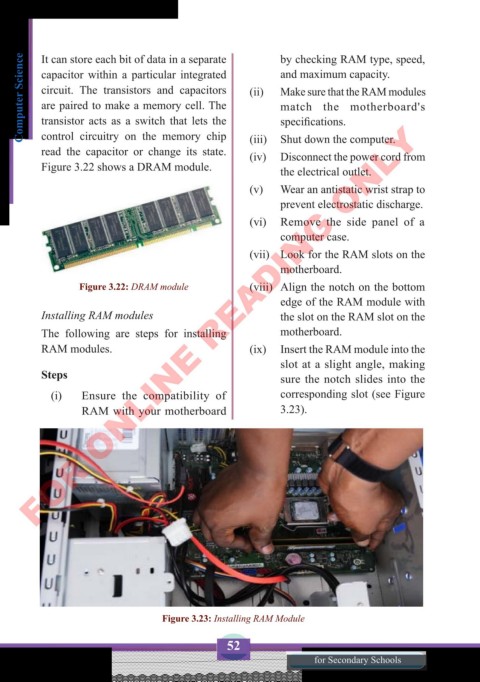
          RAM modules.                               (ix)  Insert the RAM module into the
                                                           slot at a slight angle, making
          Steps                                            sure the notch slides into the
            (i)   Ensure the compatibility of              corresponding slot (see Figure
                  RAM with your motherboard                3.23).


                                   Figure 3.23: Installing RAM Module

                                                52
                                                                  for Secondary Schools

