


Page 64 - Computer
P. 64
Computer Science  FMs tend to be  more  expensive  on a   no  moving  parts,  access  times  are
          per-gigabyte basis compared to HDD's.
                                                   faster, power consumption is lower,
          However, as technology  advances  and
                                                   and durability  is higher. SSDs  are
          economies of scale come into play, FMs
                                                   substantially  faster than regular hard
          prices gradually decreased, making them
        FOR ONLINE READING ONLY
                                                   drives. They provide faster data read and
          a more affordable option for consumers
          and businesses. Examples of FMs  are     write speeds. This results in faster boot
                                                   times, quicker application loading, and
          Solid  State  Disc  (SDD's),  USB  flash
          drives, and memory cards.                increased system performance. SSDs
                                                   outperform HDDs in terms of reliability.
          Solid State Disc                         Since there are no moving parts, there
          The  Solid-State  Disc  (SSD) has  no    is less wear and  tear, lowering the
          moving parts.  They are differ from      possibility of mechanical failure. SSDs
          HDDs,  which have spinning disks  are also more resistant to physical shock
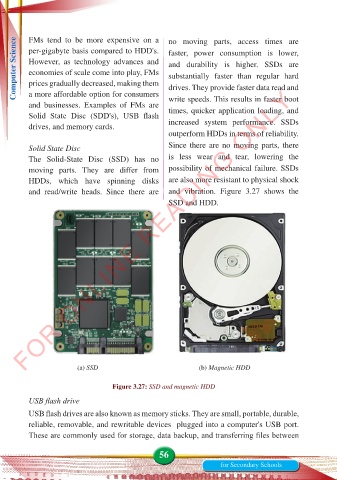
          and  read/write  heads.  Since  there  are  and vibration. Figure 3.27 shows  the
                                                   SSD and HDD.


                        (a) SSD                             (b) Magnetic HDD

                                  Figure 3.27: SSD and magnetic HDD

          USB flash drive
          USB flash drives are also known as memory sticks. They are small, portable, durable,
          reliable, removable, and rewritable devices  plugged into a computer's USB port.
          These are commonly used for storage, data backup, and transferring files between


                                                56
                                                                  for Secondary Schools

