


Page 79 - Computer
P. 79
(iv)   A new file will open. You can now start adding content to your file.
              (v)  When finished, click the File menu.
              (vi)  Click Save as icon.                                                          Computer Science
              (vii)  Choose a location to save your file and enter a filename.
        FOR ONLINE READING ONLY
              (viii) Click on the Save button.

            Your file will now be saved. You can open it again at any time by double-clicking
            on the filename.

            Create a folder

            To create a folder, follow these steps:
                (i)  Open the location where you want to create the folder. This could be on
                     your desktop, or in a document library.
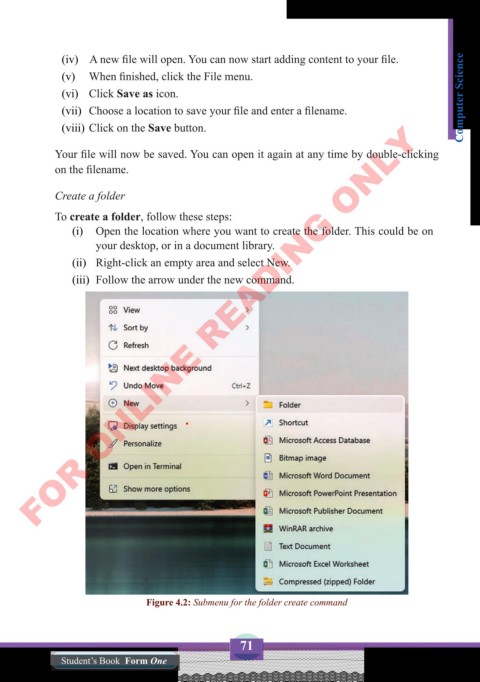
                (ii)  Right-click an empty area and select New.
                (iii)  Follow the arrow under the new command.


                               Figure 4.2: Submenu for the folder create command


                                                   71
              Student’s Book  Form One

