


Page 183 - Computer_Science_F5
P. 183
Computer Science  Connection: The client connects to the  FTP  ensures  secure  and  reliable  file
           server using FTP and authenticates with  transfers between the client and server.
           a username and password.

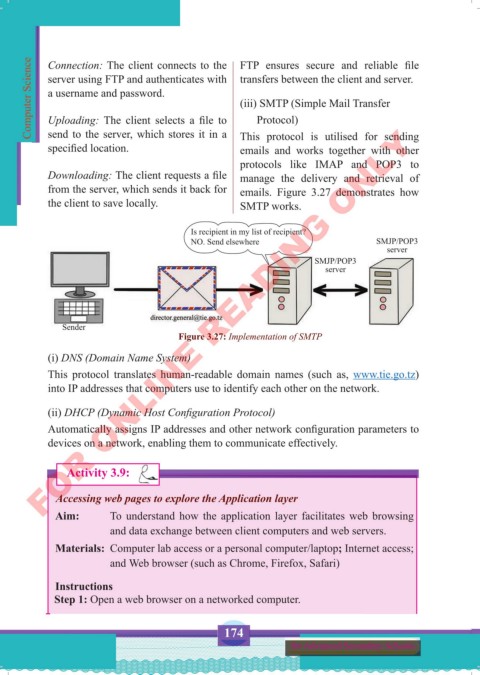
                                                     (iii) SMTP (Simple Mail Transfer
           Uploading:  The  client  selects  a  file  to        Protocol)
          FOR ONLINE READING ONLY
           send to the server, which stores it in a
           specified location.                       This protocol  is utilised  for sending
                                                     emails  and works together with other
                                                     protocols  like  IMAP  and  POP3 to
           Downloading: The client requests a file   manage  the  delivery  and retrieval  of
           from the server, which sends it back for   emails.  Figure 3.27 demonstrates  how
           the client to save locally.               SMTP works.


                                          Is recipient in my list of recipient?
                                          NO. Send elsewhere                      SMJP/POP3
                                                                                    server
                                                                     SMJP/POP3
                                                                       server


              Sender
                                       Figure 3.27: Implementation of SMTP

           (i) DNS (Domain Name System)
           This protocol translates  human-readable  domain  names (such as,  www.tie.go.tz)
           into IP addresses that computers use to identify each other on the network.

           (ii) DHCP (Dynamic Host Configuration Protocol)

           Automatically assigns IP addresses and other network configuration parameters to
           devices on a network, enabling them to communicate effectively.


                Activity 3.9:

             Accessing web pages to explore the Application layer
             Aim:        To understand how the application layer facilitates web browsing
                         and data exchange between client computers and web servers.

             Materials:  Computer lab access or a personal computer/laptop; Internet access;
                         and Web browser (such as Chrome, Firefox, Safari)

             Instructions
             Step 1: Open a web browser on a networked computer.


                                                 174
                                                                for Advanced Secondary Schools


     Computer Science Form 5.indd   174                                                     23/07/2024   12:33

