


Page 365 - Computer_Science_F5
P. 365
Computer Science  Aim: Understand and visualise the execution of code involving inheritance in
              Activity 5.8:

             Visualisation of execution code in inheritance of class Vehicle


                  Java using the Vehicle class and its subclasses.

          FOR ONLINE READING ONLY
              Materials: Computer with internet access, Jeliot 3 installed or access to an
                          online Java compiler, Sample code
            Instructions:
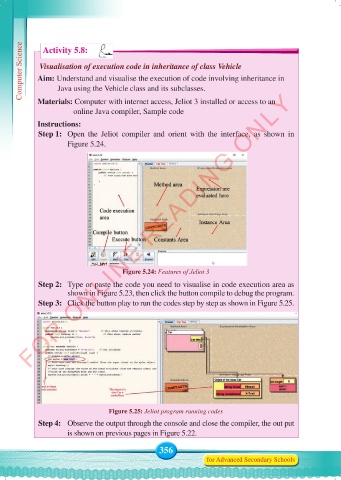
             Step 1:   Open the Jeliot compiler  and orient with the interface,  as shown in
                     Figure 5.24.


                                      Figure 5.24: Features of Jeliot 3

             Step 2:   Type or paste the code you need to visualise in code execution area as
                     shown in Figure 5.23, then click the button compile to debug the program.
             Step 3:   Click the button play to run the codes step by step as shown in Figure 5.25.


                                  Figure 5.25: Jeliot program running codes
             Step 4:   Observe the output through the console and close the compiler, the out put
                     is shown on previous pages in Figure 5.22.

                                                 356
                                                                for Advanced Secondary Schools


     Computer Science Form 5.indd   356                                                     23/07/2024   12:34

