


Page 396 - Computer_Science_F5
P. 396
Materials: Computer

               Instructions:
               Step 1:   In the start bar, type cmd.exe
               Step 2:   Open the command prompt                                                   Chapter Six: Object oriented programming with Python
          FOR ONLINE READING ONLY
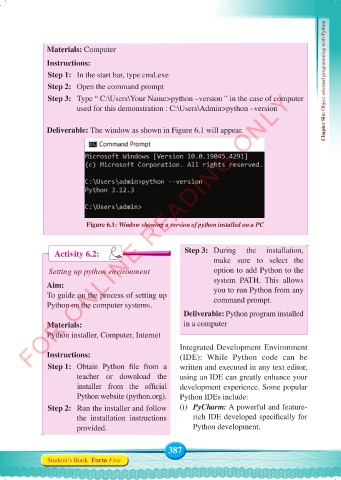
               Step 3:   Type “ C:\Users\Your Name>python –version ” in the case of computer
                        used for this demonstration : C:\Users\Admin>python –version


               Deliverable: The window as shown in Figure 6.1 will appear.


                           Figure 6.1: Window showing a version of python installed on a PC


                                                         Step 3:  During    the   installation,
                  Activity 6.2:
                                                                  make sure to select the
                Setting up python environment                     option to add Python to the
                                                                  system PATH.  This allows
               Aim:                                               you to run Python from any
               To guide on the process of setting up              command prompt.
               Python on the computer systems.
                                                         Deliverable: Python program installed
               Materials:                                in a computer
               Python installer, Computer, Internet

                                                       Integrated Development Environment
               Instructions:                           (IDE): While  Python code can be
               Step 1:   Obtain  Python  file  from  a   written and executed in any text editor,
                        teacher or download the        using an IDE can greatly enhance your
                        installer  from  the  official   development experience. Some popular
                        Python website (python.org).   Python IDEs include:
               Step 2:   Run the installer and follow   (i)  PyCharm: A powerful and feature-
                        the installation instructions      rich IDE developed specifically for
                        provided.                          Python development.


                                                    387
               Student’s Book  Form Five


     Computer Science Form 5.indd   387                                                     23/07/2024   12:34

