


Page 397 - Computer_Science_F5
P. 397
Computer Science  (ii)  Visual Studio Code (VSCode):   Other  IDEs includes  Thonny, Netbeans  or
                                              Eclipse. The  IDEs are  preferable  when using
               A lightweight and versatile
                                              large collections of python files. Using an IDE
               code editor with excellent
                                              provides  features such as  code  completion,
               Python support through
                                              debugging  tools, integrated  terminal,  and
               extensions.
          FOR ONLINE READING ONLY
                                              easier to write and manage your Python code.
           (iii) IDLE: The default Python     project  management  capabilities,  making  it
               IDE that comes bundled with    In some examples in this book, text editors like
               the Python installation.       Notepad will be used.


           Writing a simple Python program

                Activity 6.3:

             Writing the first Python program: “Hello fellow Africans”

            Aim:
            To understand the basic syntax and structure of a Python program
            Materials:
            Text editor (Such as Notepad) or any IDE, Computer installed with Python

             Instructions:
             Step 1:   Open a text editor, Notepad++
             Step 2:   Type the following code:
                           print(“Hello fellow Africans!”)

             Step 3:   Save your first program in a Notepad as “HelloAfrica.py” at any location.
                     In this case file is stored in Python folder on desktop. Note that, (.py is
                     an extension for python files)
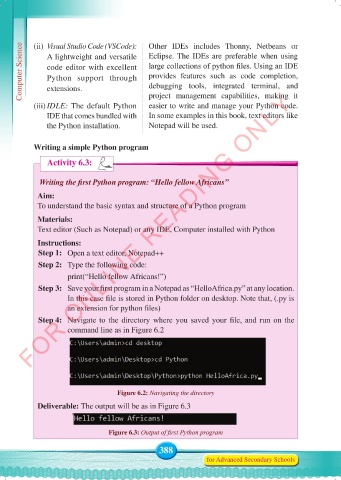
             Step 4:   Navigate to the directory where you saved your file, and run on the
                     command line as in Figure 6.2


                                    Figure 6.2: Navigating the directory

            Deliverable: The output will be as in Figure 6.3


                                  Figure 6.3: Output of first Python program

                                                 388
                                                                for Advanced Secondary Schools


     Computer Science Form 5.indd   388                                                     23/07/2024   12:34

