


Page 480 - Computer_Science_F5
P. 480
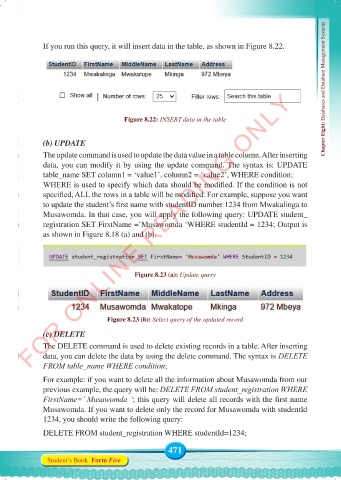
If you run this query, it will insert data in the table, as shown in Figure 8.22.


          FOR ONLINE READING ONLY


                                       Figure 8.22: INSERT data in the table                       Chapter Eight: Databases and Database Management Systems


              (b) UPDATE
              The update command is used to update the data value in a table column. After inserting
              data, you can modify it by using the update command. The syntax is: UPDATE
              table_name SET column1 = ‘value1’, column2 = ‘value2’, WHERE condition;
              WHERE is used to specify which data should be modified. If the condition is not
              specified, ALL the rows in a table will be modified. For example, suppose you want
              to update the student’s first name with studentID number 1234 from Mwakalinga to
              Musawomda. In that case, you will apply the following query: UPDATE student_
              registration SET FirstName =’Musawomda ‘WHERE studentId = 1234; Output is
              as shown in Figure 8.18 (a) and (b).


                                          Figure 8.23 (a): Update query


                                 Figure 8.23 (b): Select query of the updated record
              (c) DELETE
              The DELETE command is used to delete existing records in a table. After inserting
              data, you can delete the data by using the delete command. The syntax is DELETE
              FROM table_name WHERE condition;

              For example: if you want to delete all the information about Musawomda from our
              previous example, the query will be: DELETE FROM student_registration WHERE
              FirstName=’ Musawomda ‘; this query will delete all records with the first name
              Musawomda. If you want to delete only the record for Musawomda with studentId
              1234, you should write the following query:

              DELETE FROM student_registration WHERE studentId=1234;

                                                    471
               Student’s Book  Form Five


     Computer Science Form 5.indd   471                                                     23/07/2024   12:35

