


Page 481 - Computer_Science_F5
P. 481
Computer Science  Data Query Language (DQL) command DQL is used to fetch the data from the
           database.  It  uses only  one  command,  which  is SELECT. Its syntax  is SELECT
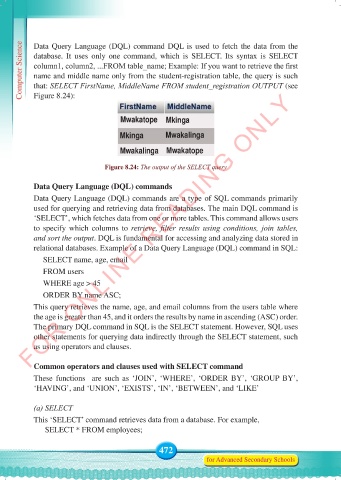
           column1, column2, ...FROM table_name; Example: If you want to retrieve the first
           name and middle name only from the student-registration table, the query is such
           that: SELECT FirstName, MiddleName FROM student_registration OUTPUT (see
          FOR ONLINE READING ONLY
           Figure 8.24):


                                     Mwakatope     Mkinga
                                     Mkinga        Mwakalinga

                                     Mwakalinga    Mwakatope


                                 Figure 8.24: The output of the SELECT query

           Data Query Language (DQL) commands
           Data Query Language (DQL) commands are a type of SQL commands primarily
           used for querying and retrieving data from databases. The main DQL command is
           ‘SELECT’, which fetches data from one or more tables. This command allows users
           to specify which columns to  retrieve,  filter  results  using  conditions,  join  tables,
           and sort the output. DQL is fundamental for accessing and analyzing data stored in
           relational databases. Example of a Data Query Language (DQL) command in SQL:
              SELECT name, age, email
              FROM users
              WHERE age > 45

              ORDER BY name ASC;
           This query retrieves the name, age, and email columns from the users table where
           the age is greater than 45, and it orders the results by name in ascending (ASC) order.
           The primary DQL command in SQL is the SELECT statement. However, SQL uses
           other statements for querying data indirectly through the SELECT statement, such
           as using operators and clauses.


           Common operators and clauses used with SELECT command
           These  functions   are  such  as  ‘JOIN’, ‘WHERE’,  ‘ORDER BY’, ‘GROUP  BY’,
           ‘HAVING’, and ‘UNION’, ‘EXISTS’, ‘IN’, ‘BETWEEN’, and ‘LIKE’


           (a) SELECT
           This ‘SELECT’ command retrieves data from a database. For example,
               SELECT * FROM employees;


                                                 472
                                                                for Advanced Secondary Schools


     Computer Science Form 5.indd   472                                                     23/07/2024   12:35

