


Page 328 - Computer_Science_F5
P. 328
FOR ONLINE READING ONLY


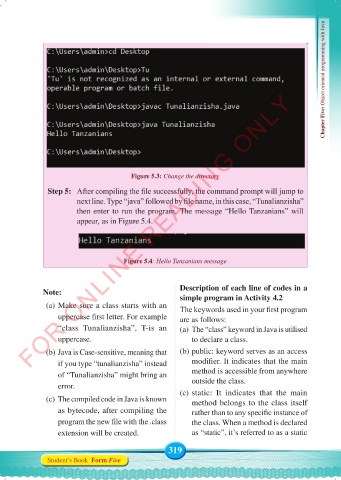
                                         Figure 5.3: Change the directory                          Chapter Five: Object oriented programming with Java

               Step 5:   After compiling the file successfully, the command prompt will jump to
                        next line. Type “java” followed by file name, in this case, “Tunalianzisha”
                        then enter to run the program. The message “Hello Tanzanians” will
                        appear, as in Figure 5.4.


                                      Figure 5.4: Hello Tanzanians message


              Note:                                    Description of each line of codes in a
                                                       simple program in Activity 4.2
               (a) Make sure a class starts with an    The keywords used in your first program
                   uppercase first letter. For example   are as follows:
                   “class Tunalianzisha”, T-is  an     (a) The “class” keyword in Java is utilised
                   uppercase.                              to declare a class.

               (b) Java is Case-sensitive, meaning that   (b) public: keyword serves as an access
                   if you type “tunalianzisha” instead     modifier. It indicates that the main
                   of “Tunalianzisha” might bring an       method is accessible from anywhere
                   error.                                  outside the class.
                                                       (c) static: It indicates that the main
               (c) The compiled code in Java is known      method belongs to the class itself
                   as bytecode, after compiling the        rather than to any specific instance of

                   program the new file with the .class    the class. When a method is declared
                   extension will be created.              as “static”, it’s referred to as a static

                                                    319
               Student’s Book  Form Five


     Computer Science Form 5.indd   319                                                     23/07/2024   12:34

