


Page 431 - Computer_Science_F5
P. 431
Computer Science  Objective:
                 Activity 7.4:

              Visualizing CPU/Process scheduling using simulation tool


          FOR ONLINE READING ONLY
            Create executable programs, load them into the CPU memory, and run them under
            the control of the operating system.

            Instructions:

             Step 1:  Start the CPU simulator (refer to previous experiments using the CPU
                      simulator).
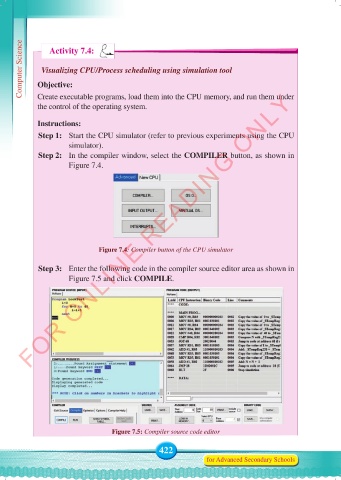
             Step 2:   In the compiler window, select the COMPILER button, as shown in
                      Figure 7.4.


                               Figure 7.4: Compiler button of the CPU simulator


             Step 3:  Enter the following code in the compiler source editor area as shown in
                      Figure 7.5 and click COMPILE.


                                   Figure 7.5: Compiler source code editor

                                                 422
                                                                for Advanced Secondary Schools


     Computer Science Form 5.indd   422                                                     23/07/2024   12:34

