


Page 432 - Computer_Science_F5
P. 432
Chapter Seven: Operating Systems


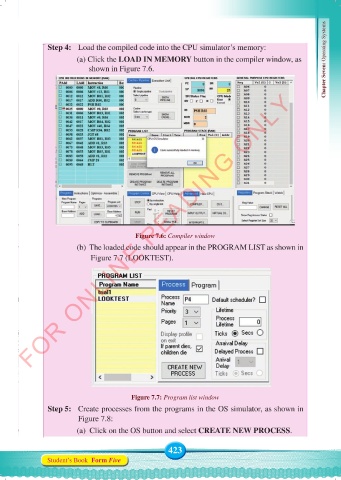
               Step 4:  Load the compiled code into the CPU simulator’s memory:
                        (a) Click the LOAD IN MEMORY button in the compiler window, as
                              shown in Figure 7.6.


          FOR ONLINE READING ONLY


                                          Figure 7.6: Compiler window
                        (b)  The loaded code should appear in the PROGRAM LIST as shown in
                               Figure 7.7 (LOOKTEST).


                                         Figure 7.7: Program list window
               Step 5:   Create processes from the programs in the OS simulator, as shown in
                         Figure 7.8:
                        (a)  Click on the OS button and select CREATE NEW PROCESS.


                                                    423
               Student’s Book  Form Five


     Computer Science Form 5.indd   423                                                     23/07/2024   12:34

