


Page 205 - Computer_Science_F5
P. 205
Computer Science  PC-PT      PC-PT             (b) Assign IP addresses (Such as PC0:
                                                         192.168.1.2, PC1: 192.168.1.3,
                                                         PC2: 192.168.1.4) with subnet
                                                         masks (usually 255.255.255.0).
                    PC2
                                      PC3
          FOR ONLINE READING ONLY
                                                      Step 6: Test connectivity
                                                      Use the “Command Prompt” on each
                                                      PC to  ping  other  PCs’ IP addresses

                          2950-24                     for connectivity verification (such as
                          Switch0                     from PC0, ping 192.168.1.3).

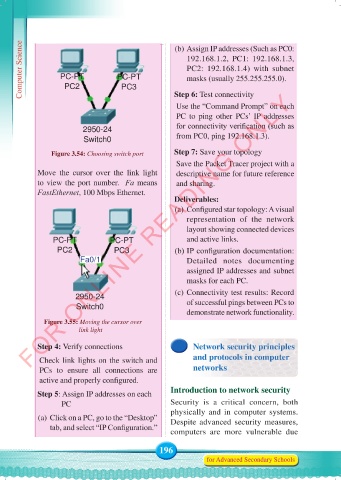
                 Figure 3.54: Choosing switch port    Step 7: Save your topology
                                                      Save the Packet Tracer project with a
            Move the cursor over the link light       descriptive name for future reference
            to view the port number.  Fa means        and sharing.
            FastEthernet, 100 Mbps Ethernet.
                                                      Deliverables:
                                                      (a) Configured star topology: A visual
                                                         representation of the network
                                                         layout showing connected devices
                 PC-PT            PC-PT                  and active links.
                  PC2              PC3                (b) IP configuration documentation:
                         Fa0/1                           Detailed notes documenting
                                                         assigned IP addresses and subnet
                                                         masks for each PC.

                        2950-24                       (c) Connectivity test results: Record
                        Switch0                          of successful pings between PCs to
                                                         demonstrate network functionality.
                Figure 3.55: Moving the cursor over
                                     link light
            Step 4: Verify connections                     Network security principles

             Check link lights on the switch and           and protocols in computer
             PCs to ensure all connections are             networks
             active and properly configured.
            Step 5: Assign IP addresses on each      Introduction to network security
                    PC                               Security is a critical concern, both
                                                     physically and  in  computer  systems.
             (a) Click on a PC, go to the “Desktop”   Despite advanced security measures,
                tab, and select “IP Configuration.”
                                                     computers are more vulnerable due

                                                 196
                                                                for Advanced Secondary Schools


     Computer Science Form 5.indd   196                                                     23/07/2024   12:33

