


Page 202 - Computer_Science_F5
P. 202
determine how data flows within a network and how devices communicate with
              each other. Creating network topologies using a simulator like Cisco packet tracer is
              a great way to practice and visualise how different devices and connections interact
              within a network.                                                                    Chapter Three: Advanced Computer Networks

          FOR ONLINE READING ONLY
                   Activity 3.13:

                Creating a star topology using Cisco Packet Tracer


                Aim:       To design and simulate a Star Topology network configuration using
                           Cisco Packet Tracer, demonstrating proficiency in network layout
                           and device connectivity.

                Materials: Computer,  Cisco Packet Tracer software,  Internet connection for
                           accessing Packet Tracer resources
                Instructions

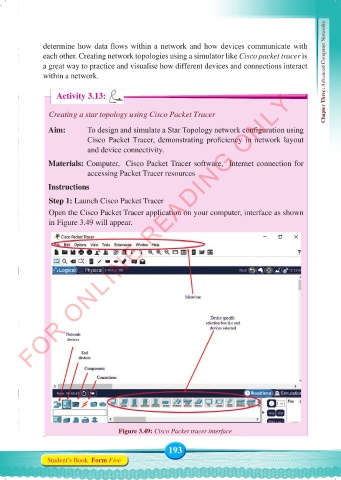
                Step 1: Launch Cisco Packet Tracer
                Open the Cisco Packet Tracer application on your computer, interface as shown
                in Figure 3.49 will appear.


                                     Figure 3.49: Cisco Packet tracer interface

                                                    193
               Student’s Book  Form Five


     Computer Science Form 5.indd   193                                                     23/07/2024   12:33

