


Page 203 - Computer_Science_F5
P. 203
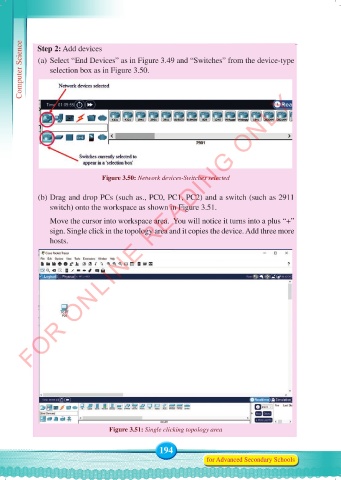
Computer Science  Step 2: Add devices
             (a) Select “End Devices” as in Figure 3.49 and “Switches” from the device-type
                selection box as in Figure 3.50.


          FOR ONLINE READING ONLY


                                Figure 3.50: Network devices-Switches selected

             (b) Drag and drop PCs (such as., PC0, PC1, PC2) and a switch (such as 2911
                switch) onto the workspace as shown in Figure 3.51.

                 Move the cursor into workspace area.  You will notice it turns into a plus “+”
                sign. Single click in the topology area and it copies the device. Add three more
                hosts.


                                  Figure 3.51: Single clicking topology area


                                                 194
                                                                for Advanced Secondary Schools


     Computer Science Form 5.indd   194                                                     23/07/2024   12:33

