


Page 235 - Computer_Science_F5
P. 235
Computer Science  //         This is a double forward slash. Any text  written  after
                                    these slashes is ignored by a compiler because it stands

                                    as a comment.
                                     N.B:- Comments are not the line of codes; hence, they
                                    are not compiled. While double slashes “//” stands, as a
          FOR ONLINE READING ONLY
                                    line comment, the enclosed lines with the star “/*…….*/”
                                    stand as a paragraph comment.
            cout<<”Introduction     “cout”  represents console output that sends a message
                                    to the compiler to display the text “Introduction to  C++
            to
                                    program.”
             C++ program”<<endl; “<<” stand as insertion operator which send string of texts
                                    to the console. A text should be enclosed by quotation
                                    marks.“endl” represents the end line sending a message
                                    to the console to output a new line and ensure the text is
                                    displayed.
            return 0                Located at the end of the main function responsible for
                                    exiting the program


           Environment setup for C++ program

           Before you create a C++ program, you must install C++ Compiler. The compiler is
           a software that enables a program to be created to communicate with the computer
           systems. There are many compilers that can be used in C++ programming, which
           include  Dev  C++,  Boland  C++,  and  Visual  C++.  Other  compilers  are  available
           online. All examples in this book were prepared using Dev C++.


           Installation of Dev C++ compiler
           The following are steps to install Dev C++ compiler (Based on Version 5.11):
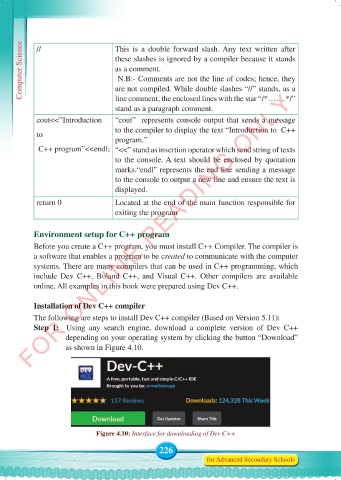
           Step 1:  Using any search engine, download a complete  version of Dev C++
                     depending on your operating system by clicking the button “Download”
                     as shown in Figure 4.10.


                              Figure 4.10: Interface for downloading of Dev C++

                                                 226
                                                                for Advanced Secondary Schools


     Computer Science Form 5.indd   226                                                     23/07/2024   12:33

