


Page 240 - Computer_Science_F5
P. 240
FOR ONLINE READING ONLY


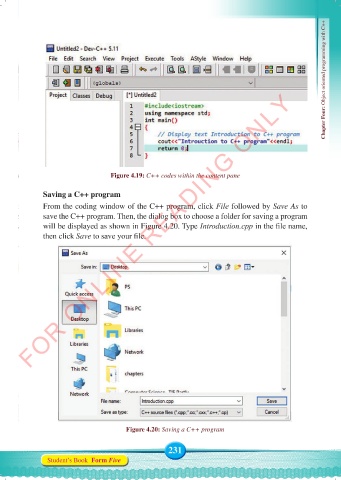
                                  Figure 4.19: C++ codes within the content pane                   Chapter Four: Object oriented programming with C++


              Saving a C++ program
              From the coding window of the C++ program, click File followed by Save As to
              save the C++ program. Then, the dialog box to choose a folder for saving a program
              will be displayed as shown in Figure 4.20. Type Introduction.cpp in the file name,
              then click Save to save your file.


                                       Figure 4.20: Saving a C++ program


                                                    231
               Student’s Book  Form Five


     Computer Science Form 5.indd   231                                                     23/07/2024   12:33

