


Page 241 - Computer_Science_F5
P. 241
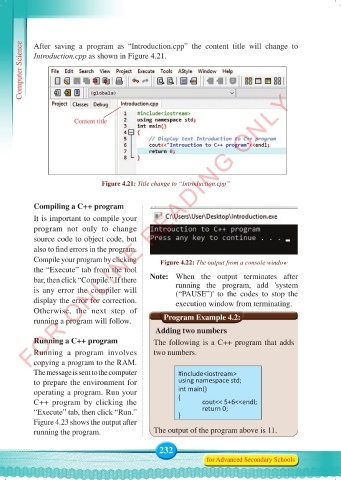
Computer Science  After saving a program as “Introduction.cpp”  the content  title  will change to
           Introduction.cpp as shown in Figure 4.21.


          FOR ONLINE READING ONLY


                       Content title


                                Figure 4.21: Title change to “Introduction.cpp”


           Compiling a C++ program
           It is important to compile your
           program  not  only  to  change
           source code to object code, but
           also to find errors in the program.
           Compile your program by clicking       Figure 4.22: The output from a console window
           the “Execute” tab from the tool
           bar, then click “Compile.” If there   Note:   When  the  output  terminates  after
           is any error the compiler will             running the  program,  add 'system
                                                      (“PAUSE”)' to the codes to stop the
           display the error for correction.          execution window from terminating.
           Otherwise, the next step of
           running a program will follow.            Program Example 4.2:
                                                 Adding two numbers
           Running a C++ program               The following is a C++ program that adds

           Running a program involves          two numbers.
           copying a program to the RAM.
           The message is sent to the computer         #include<iostream>
           to prepare the environment for              using namespace std;
           operating a program. Run your               int main()
           C++ program by clicking the                 {      cout<< 5+6<<endl;
           “Execute” tab, then click “Run.”            }      return 0;
           Figure 4.23 shows the output after
           running the program.                The output of the program above is 11.

                                                 232
                                                                for Advanced Secondary Schools


     Computer Science Form 5.indd   232                                                     23/07/2024   12:33

